See it in action
Search your whole history, pick with the keyboard, and paste straight back.
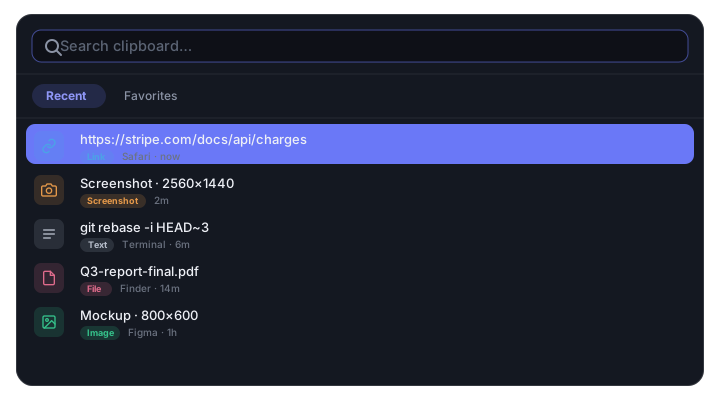
macOS forgets what you copied the instant you copy again. EverClip doesn't. Every copy — text, links, images, screenshots, files — is captured, searchable, and kept forever, entirely on your Mac.
Free & open source · No account · Nothing leaves your Mac
Search your whole history, pick with the keyboard, and paste straight back.
Everything you copy, captured automatically and ready the moment you need it again.
Text, rich text, links, images, screenshots and files — all captured the instant you copy. Copy the same thing twice and it just floats to the top instead of piling up.
An SQLite FTS5 index finds any snippet as you type, with filters by type and a Favorites tab for the things you paste all day.
100% local. Password-manager copies (concealed & transient) are skipped automatically. Exclude any app, pause anytime, delete anything.
Hit ⌥⌘V from any app, pick an item, and it pastes straight into whatever you were working in. Arrow keys and ⌘1–9 for the fastest picks.
macOS remembers exactly one thing you copied. Here's what you're missing — and how EverClip stacks up against the paid alternatives.
One slot only. Every copy overwrites the last. Copy a second thing and the first is gone — nothing to scroll back to.
No history, no search. The pasteboard is a single in-memory slot — there's no list to browse and nothing to search.
Tahoe's new list is thin. macOS 26 adds a Spotlight clipboard list, but it's text-focused, capped at 7 days, has no real search, and is Mac-only.
Universal Clipboard is fragile. Same Apple ID, Bluetooth + Wi-Fi + Handoff all on, devices nearby, ~2-minute timeout — and still just one item.
| App | Price | Open source | 100% local | Unlimited history + search | Images & files |
|---|---|---|---|---|---|
| macOS built-in | Free | — | ✓ | — (1 item) | Limited |
| EverClip | Free | ✓ | ✓ | ✓ | ✓ |
| Maccy | Free · $9.99 MAS | ✓ | ✓ | ✓ | Images only |
| Paste | $29.99/yr | — | iCloud sync | ✓ | ✓ |
| Raycast | Free · Pro ~$8/mo | — | Pro = cloud | ✓ | ✓ |
| Pastebot | $39 one-time | — | ✓ | ✓ | ✓ |
| Alfred | £34 Powerpack | — | ✓ | ✓ | ✓ |
Prices as of Sept 2026 — check each vendor for current pricing. EverClip is the only option that is free, open-source, strictly local, and covers text, images, screenshots and files with full-text search.
The honest version: if you live on one Mac and want auditable, local-only clipboard history for free, EverClip wins. If you need iPhone/iPad sync or visual pinboards today, a paid app like Paste or Pastebot is still ahead — cross-device sync is on the EverClip roadmap.
No servers, no accounts, no telemetry. History lives in a local SQLite database under Application Support. Optional backup to your own Google Drive or Gmail is strictly opt-in and off by default.
A tiny menu-bar app that stays out of your way until you need it.
EverClip runs as a lightweight menu-bar agent — no Dock clutter. Enable launch-at-login and forget it's there.
Keep working. Every copy is captured in the background in about a third of a second, with a thumbnail for images.
Open the panel from anywhere, search or scroll, press Enter, and it pastes right back where you left off.